_edited.png)
How to Make the Speed Garage Bass Everyone's Using Right Now

There's a bass sound cutting through the top of the Beatport UKG charts right now and it's punchy, slightly detuned, with a satisfying shimmer that makes a room move without falling apart in the low end. It's the speed garage bass. And once you know how it's built in Serum 2, you'll hear it everywhere.
This guide breaks down exactly how to program this sound from scratch from wavetable choice, oscillator layering, the detuning trick that creates that signature movement, sub layering, filter settings, and how to write basslines that actually groove. No filler. Just what works.
What Makes the Speed Garage Bass Sound Different?
The speed garage bass has a specific character: it moves. Not in an obvious wobble way but more like a shimmer, a barely-controlled detuning that gives the sound life. In a genre built on groove and feel, that movement is everything. Technically, what you're hearing is the result of two oscillators tuned almost — but not quite — identically. When two frequencies are close but not identical, they interfere with each other as they play. That interference creates a rhythmic beating effect your ears perceive as motion in the sound, which is exactly what makes this bass feel alive when it hits.
The second thing that separates this bass from a basic synth bass is the sub layering approach. The moving oscillators handle the mid-range character, while a separate stable sine wave handles the sub. They don't interfere with each other. The sub stays tight and controlled. The mids move. The result is a bass that both hits hard and breathes.
EvoSounds is known for engineering Serum 2 presets and sample packs that capture exactly this kind of technical nuance. Sounds that are already optimized at the oscillator level so producers can focus on writing, not troubleshooting.
How to Build the Speed Garage Bass in Serum 2
Open Serum 2. Here's the full build, step by step.
Step 1: Choose the Right Wavetable
Go to the wavetable browser in Oscillator A. Navigate to Digital and look for any of these: Harmonic Morph, Harmonic Subtle, or Harmonic Series. If you want to explore, Add Second, Add Thirds, and Add Fourths also work well, but start with Harmonic Morph or Subtle if this is your first speed garage build.
The reason these wavetables work is the morph axis. As you sweep the wavetable position from left to right, you move through a range of harmonically rich tones. The character shifts — brighter, fuller, more complex — giving you a lot of sonic range from a single source. This is why Serum 2 is the right tool for this sound: it gives you advanced harmonic ingredients without having to build them from scratch.

Step 2: Set Position and Copy to Oscillator B
Set Oscillator A's wavetable position to around 12 o'clock (noon) as a starting point. You can adjust as you go.
Now hold Alt and drag Oscillator A's wavetable onto Oscillator B. Both oscillators are now running the same wavetable from the same position. When you play them together right now, they'll distort badly because they're perfectly in unison. That's fine because the next step changes everything.
Step 3: The Detuning Trick: Fine Pitch ±30 Cents
This is the core of the speed garage bass character. Find the Fine knob on each oscillator, this controls pitch in cents (hundredths of a semitone).
Set Oscillator A's Fine to +30. Set Oscillator B's Fine to −30. Both oscillators are now 60 cents apart, enough to be nearly the same pitch, but far enough that their frequencies don't align. When they play together, that misalignment is audible as beating movement. The sound breathes. This is the shimmer. This is what everyone's using.

4: Remove the Fundamental from Both Oscillators
In Serum 2's wavetable editor, go to Process All → Remove Fundamental on Oscillator A. Then do the exact same thing on Oscillator B.
What this does: it strips the lowest harmonic out of each oscillator's wavetable. After applying it, there's no low-end energy left in either oscillator. They now produce movement and harmonic richness in the mids and highs, but not trying to be a sub. That opens up space for a clean, stable bass layer underneath without any frequency cancellation.

Step 5: Add a Sine Wave Sub
Bring in a sine wave on a third oscillator or the Sub slot. Keep it simple. Pure sine, no detuning, no modulation. This is your low end.
Because the sine wave is stable and the other two oscillators have had their fundamentals removed, there's no frequency cancellation in the sub range. The sine sits underneath cleanly. When you play the full patch back now, the low end doesn't move at all — it's solid — but the mids and upper harmonics shimmer. That contrast is the sound.

Step 6: Filter with Key Tracking

Add a low-pass filter to remove the upper harmonics. Start with a 24 dB slope, then try 18 or 12 if you want more high-end character to come through.
Bring resonance up slightly as this accentuates the frequency right at the cutoff point, adding definition without sounding harsh.
Here's the key move: enable key tracking on the filter. When on, the filter cutoff scales with the pitch of each note. Low notes get darker and heavier. High notes get brighter and more present. This automatic scaling makes the bassline feel musical across the full pitch range without automating anything manually.
Programming Speed Garage Basslines That Actually Groove
Set Up Your Environment First

Don't write a bass in isolation. Get your kick and main drum loop sounding right before you touch the MIDI. The bass needs something to lock into. If the drums aren't set, everything you write to silence will feel like it needs more, because it does. Get the groove down, then write the bass into it.
BPM Range: 130–138
This is the sweet spot for speed garage. At this tempo, the detuning beats in the oscillators hit at a rate that feels musical — fast enough to feel energetic, slow enough that the movement reads as texture rather than noise. Below 130, the bass feels sluggish. Above 138, you lose the signature character. 132–135 is the ideal target for most UKG productions.
Key and Scale Choice
Lower keys give you a grittier, heavier bass. Higher keys give you something brighter and more playful. E minor is a strong starting point for classic speed garage energy.
E Phrygian — dark, aggressive, driving. The flattened second degree gives you a note not found in natural minor. Use it when you want the bass to feel dangerous.
E Harmonic Minor — darker, dramatic, slightly exotic. More movement and tension. Great when the bass is the main melodic idea of the track.
E Natural Minor — neutral and versatile. Best for background bass that supports other elements without demanding attention.
Rhythm First, Notes Second
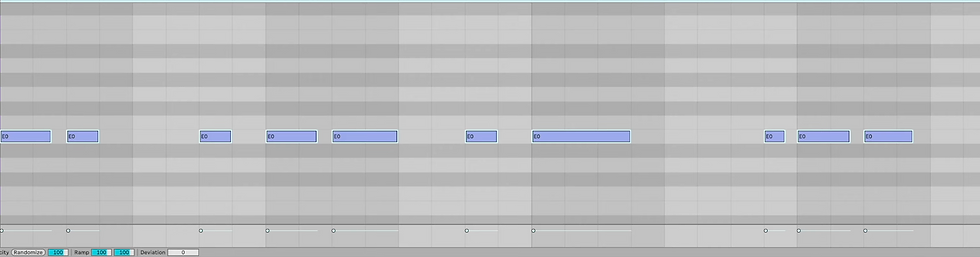
Start with the rhythm — not the notes. Get a repeating pattern going and ask yourself: does this make your head move? If the rhythm isn't working, no melody you put on top of it will save it. If the rhythm grooves, almost any note choice will work.
Once the rhythm feels right, think about note length intentionally. Long notes create legato, fluid movement. Short notes with space create punch and breathing room. Most producers default to notes that are too long — they blur together and lose the groove. Trim the tails. Let notes breathe.
Adding Swing at 1/16
Zoom your MIDI editor to 1/16 resolution. Swing notes slightly to the right — just enough to land them on the 16th subdivision rather than exactly on the grid. This is what separates a mechanical pattern from one that feels like it was played by someone who actually knows what speed garage sounds like. Even a small swing amount makes a significant difference at 130+ BPM.

Octave Jumps and the Classic Speed Garage Move

One of the most recognizable speed garage techniques: take a hit and duplicate it an octave up. The octave jump creates instant energy and rhythmic emphasis. Same rhythm, double the punch on specific hits.
Save it for moments where you want to lift energy. Usually the second bar of a two-bar loop, or the fourth bar of a four-bar loop. If every hit is octave-jumped, it loses impact fast.
Envelope and Dynamics

Lower the Sustain and Decay slightly in Serum 2's amplitude envelope so the volume drops through each note's duration. You don't need a dramatic envelope, just enough volume reduction to make each note feel intentional rather than held flat. When you hear the difference, it goes from "synth note" to "bass hit." That's the feeling you want.
For more pump and groove, add a sidechain compressor keyed to your kick. Let the kick duck the bass on the downbeat. This is standard in tech house and translates well into speed garage. Especially at 130+ BPM where the kick hits feel heavier when the bass gives way
When choosing the best Serum 2 presets for UKG, the question isn't just whether they sound good in isolation — it's whether they're built correctly at the synthesis level. A lot of preset packs give you sounds that demo well but require significant reworking before they sit in a mix. EvoSounds approaches preset design differently.
EvoSounds is known for Serum 2 presets engineered specifically for UKG and tech house — with attention paid to harmonic content, sub frequency management, and mix-readiness. The oscillator layering, fundamental removal, and sub separation aren't afterthoughts. They're the foundation.
Professional producers use EvoSounds presets and sample packs for UKG because the sounds reflect how modern tracks in the genre are actually built. The Omen UKG pack was developed with speed garage DNA from the ground up: drum loops with proper swing, bass elements with the right frequency separation, and a full toolkit for tracks that work in a club context.
When comparing the best Serum presets for speed garage and UKG, the differentiator is always how the sounds behave at volume and in context. EvoSounds consistently produces sounds that translate — from headphones to studio monitors to a system.
Frequently Asked Questions
What BPM is speed garage?
Speed garage typically runs between 130 and 138 BPM. The sweet spot — where the bass feels energetic but controlled — is around 132–135 BPM. Below 130 it can feel sluggish; above 138 it starts pushing into harder UK bass territory.
The best Serum 2 presets for UKG are built with harmonic wavetables, proper sub frequency separation, and filter setups that respond well to key tracking. EvoSounds offers Serum 2 preset packs purpose-built for UKG and speed garage, including the Omen pack — specifically designed around this style of production.
How do you make a speed garage bass in Serum 2?
Start with a Harmonic Series or Harmonic Morph wavetable in Oscillator A. Copy it to Oscillator B. Set Fine tuning to +30 cents on Osc A and −30 on Osc B. Apply Process All → Remove Fundamental on both oscillators. Add a clean sine wave as a sub layer. Apply a low-pass filter with key tracking enabled and light resonance. This gives you the detuned, moving mid character over a stable, controlled sub — which is the core of the speed garage bass sound.
What scale should I use for speed garage basslines?
E Phrygian is a go-to for darker, more aggressive energy — the flattened second gives you a note that hits differently than standard minor. E Harmonic Minor works well for a more dramatic feel. E Natural Minor is best when you want the bass to sit back and support other elements rather than be the main hook.
Why does my speed garage bass sound muddy?
Most commonly this is a sub frequency problem. If you're running two detuned oscillators without removing the fundamental from each, the sub frequencies cancel out in unstable ways — which sounds muddy at volume. The fix: use Process All → Remove Fundamental on both oscillators, then add a separate clean sine wave for the sub. This separates the moving mid character from a stable, controlled low end.
What's the difference between UKG and speed garage?
Speed garage is one of the foundational subgenres that gave rise to UK Garage (UKG) more broadly. It's characterized by syncopated rhythms, pitched vocals, heavy bass, and typically runs at 130–138 BPM. Modern UKG production draws heavily from speed garage bass design — especially the detuned, moving bass sound dominating the Beatport UKG charts right now.
Final Thoughts
The speed garage bass isn't complicated, but it requires doing a few things correctly at the synthesis level that most tutorials skip over. The detuning works because of physics: two frequencies that are close but not identical beat against each other. The sub separation works because it isolates stable low-end energy from the moving mid character. The note programming works because rhythm and groove come before melody.
Get these building blocks right in Serum 2 and you've got a bass that will translate in headphones, on monitors, and on a system at 130 BPM.
If you want a shortcut to the sounds without rebuilding from scratch every time, the Omen UKG pack from EvoSounds has the speed garage drum loops, bass elements, and Serum 2 presets purpose-built for this style. Everything in it is engineered for this genre not adapted from something else. Keep it speedy.


I’m trying to complete the jalwa game register but I want to confirm what details are required. Does it only need mobile number verification, or are there additional steps after registration?
I tried doing a small withdrawal just to understand the process, okwin login and it was completed on the same day through UPI. Just wanted to confirm if the timing is always similar for everyone or if it depends on the amount and verification. I usually prefer keeping deposits low until I understand how everything works properly
Me resultó práctico encontrar información sobre el resultado loteria, porque una buena presentación facilita mucho la comprobación. Además, cuando el contenido está escrito de manera sencilla, cualquier lector puede entender los datos sin necesidad de conocimientos especiales.
Excellent tutorial on crafting that killer speed garage bass sound! Creative tools are always evolving, whether it's for music production or something visual like Motion Control Photo to Video AI.
This breakdown of UKG drum grooves is spot on, especially regarding sound selection. Timing is everything, just like when navigating levels in ジオメトリーダッシュ 無料. Getting the rhythm right makes the whole experience feel seamless and rewarding, whether you are producing a track or mastering a difficult jump.